

The studio issue · No. 46
Wedding guests were saving a small copy. Now they get the original
By Jide Odukoya, Founder7 min read3 problems
A guest finds herself in your gallery at the reception. She saves the photo and posts it that night. On her phone it looks soft, and your name is on it.
Three problems most studios know. Each is below, with what bckendIQ did about it this week. Every other change sits at the bottom, closed.
Problem 1
A guest saves your best photo, and what she gets is a small copy
A guest scans the QR at the wedding and AI finds the photos she is in. She saves one and posts it. It looks soft, because what she saved was a preview made for a screen. Every guest who shares it is showing your work at its worst.
How bckendIQ solves it. A guest now saves the original photograph, at full size. When your gallery’s logo is on, it is stamped on the full size picture. Every photo has a checkbox, with Select all above. On a phone the picked photos go to the share sheet together. On a computer they come down as one ZIP of the originals. Every guest letter now names your studio’s email, so a guest with a question writes to you.
Problem 2
Your workshop runs for three days, and your booking page only knows time slots
You sell a three day masterclass, or a full day on location. Your booking page offers 10:00, 10:30 and 11:00. So you take the booking by message, and the deposit by transfer. Then you chase the balance yourself.
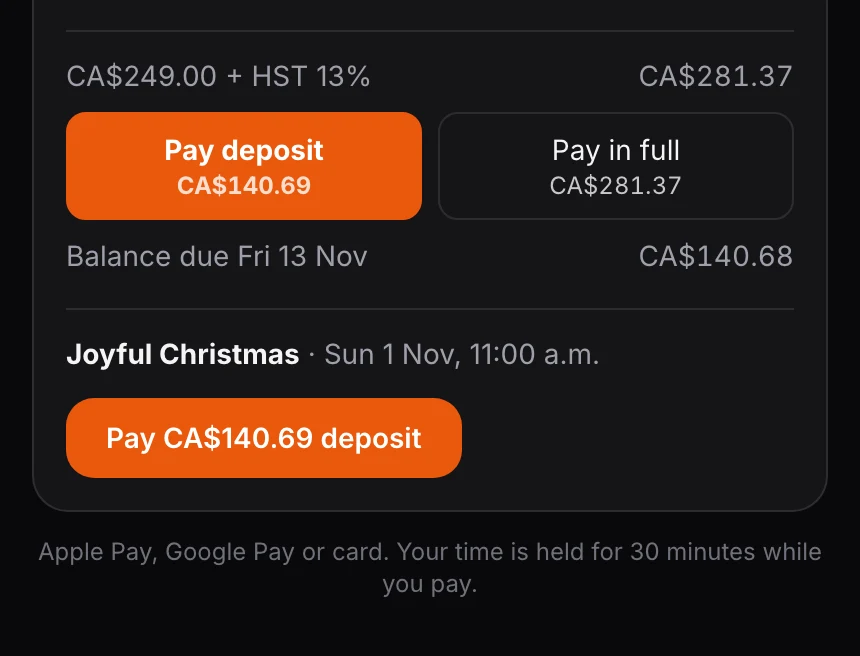
How bckendIQ solves it. A pop-up session’s length is now typed in minutes, hours or days. A session of whole days is picked by day, and the calendar fills in every day it covers. Client picks lets the client choose one, two or three days in a row, each at its own price. On a pop-up that takes a deposit, checkout offers Pay deposit or Pay in full. You set when the balance is due, and the page names that day.
Problem 3
Forty scorecards are waiting for you, and each one is its own page
It is Friday. Your editors and second shooters have filed their week. To score them you open a card, find the slider, save, go back, and open the next. So the cards wait, and your team stops believing anyone reads them.
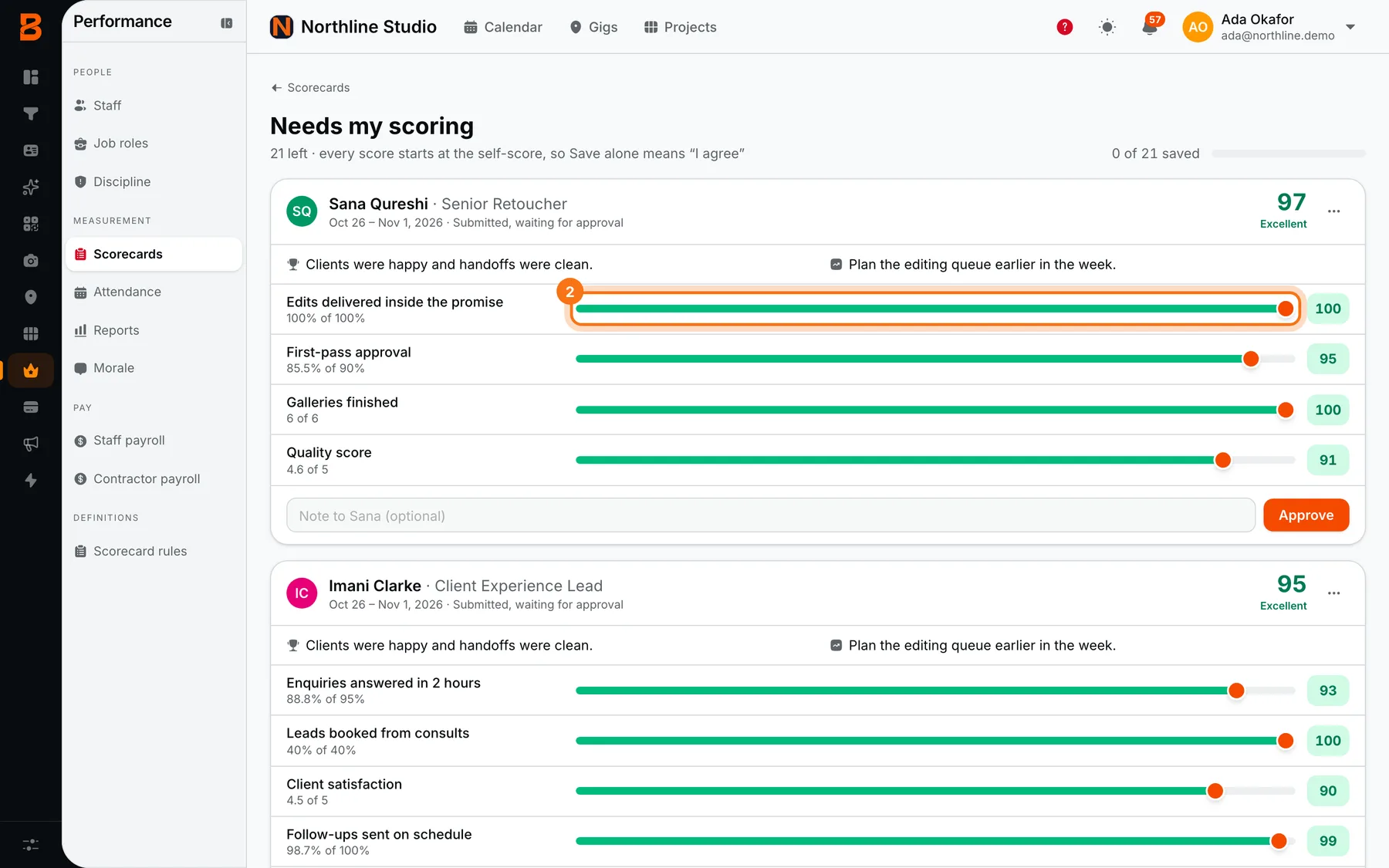
How bckendIQ solves it. Needs my scoring is now one page. Every waiting card is on it, newest week first. Each KPI has its slider in view, with a note box and one button. A saved card folds to one green line, and the next person is right below. Remind team, on Team Scorecards, reminds everyone who owes a week. Each person’s unfilled weeks now sit at the top of their own Scorecards page.
Every change this week (25)
A guest saves the original photograph, not a small copy
Guests used to get a preview made for a screen. Now they get the full size picture, with your logo stamped on it when your gallery’s logo is on.
Open it in bckendIQ →A guest picks several photos, or all, and saves them in one go
A checkbox on every photo, and Select all. A phone sends them to the share sheet together. A computer gets one ZIP of the originals.
Open it in bckendIQ →Every guest letter names your studio’s email
A guest with a question about their photos now writes to you. A reply already reached you.
Open it in bckendIQ →A pop-up session can run for days
Type its length in minutes, hours or days. A session of whole days is picked by day, and the calendar fills in every day it covers.
Open it in bckendIQ →The client picks one, two or three days in a row, each at its own price
Client picks is a third booking style, beside Timed slots and Whole days. Each session card now names its style.
Open it in bckendIQ →At checkout the client picks Pay deposit or Pay in full
You set how many days before the session the balance is due. The page names that day.
Open it in bckendIQ →Needs my scoring is one page
Every waiting card, each slider in view, a note and one button. A saved card folds to one line. A card approved with no scores can be scored too.
Open it in bckendIQ →Remind team reminds everyone who owes a scorecard
Guest staff and past weeks are included. The email lists the weeks, oldest first, and says a blank week stays on the record.
Open it in bckendIQ →Your unfilled weeks sit at the top of your Scorecards page
One button opens the oldest. The card turns amber at two weeks and red at three.
Open it in bckendIQ →A date change just saves
A day, a start time, a length, an extra date or a due day needs no reason and no client approval, signed or not. Price, venue and terms on a signed booking still do.
Open it in bckendIQ →Delete a date from its three dots on the Dates tab
A date added by mistake comes off the Dates tab, and off Gigs too.
Open it in bckendIQ →Any payment makes the person a client
A part paid retainer no longer leaves them on the Leads board. The shoot still waits for the retainer in full and your signature.
Open it in bckendIQ →Dates close together are one gig, dates far apart are gigs of their own
Eight days or more apart starts a new gig, with the same client and crew. Move either one and the other follows.
Open it in bckendIQ →A gig you retime tells its booking
The start and the length follow, not only the day. The Gigs board and the client page say the same time.
Open it in bckendIQ →Someone added to a job gets an email as well as the bell
It says which job, when, where, and the way in. A text goes to the number on their profile in the countries our texts reach.
Open it in bckendIQ →Contractors pick the country and the kinds of work they want
A guest contractor sees gigs in their own country only, with a Gigs door in their top bar. A job today now reads Today.
Open it in bckendIQ →A contractor can open My Performance
No final score shows until the manager has reviewed. A KPI the manager moved shows the person’s own number beside it.
Open it in bckendIQ →All pop-ups sorts into Current, Past and Bin
A pop-up moves to Past when its last day is over. One made by mistake goes in the Bin, and Restore brings it back. A pop-up with a paid booking is never binned.
Open it in bckendIQ →Sort the pop-up Bookings table and bin the test rows
Press a heading to sort. Narrow to Paid, Didn’t pay or Didn’t finish. Tick rows, then Bin. Paid rows stay.
Open it in bckendIQ →The pop-up editor saves itself
It saves two seconds after you stop typing. The website button keeps its words and its corner.
Open it in bckendIQ →Give the pop-up writer a link and AI drafts the page for that offer
It reads the page behind the link and writes every section, down to the last. The words wait for your own Save.
Open it in bckendIQ →A pop-up booking sits on its own day on the calendar
Two clients a day apart no longer read as a double booking. Move a client’s date on the invoice and their pin moves with it.
Open it in bckendIQ →A balance that is due can be texted as well as emailed
For a pop-up client who left a number on a form that said so, in the countries our texts reach. It follows the Payment reminder’s own switch.
Open it in bckendIQ →Delivery reasons opens with a coach
A chart of the last six months shows which jobs landed their date and why the others did not, with a move for the studio and one for each editor.
Open it in bckendIQ →Smaller fixes across the app
Every account now needs a mobile number, and the invite page asks for one. An email typed with a capital letter is the same login. Download on selected tasks saves one ZIP. Measure now finishes on a big library.
Open it in bckendIQ →
Questions about this week
- Do wedding guests get the full size photo?
- Yes. A guest now saves the original photograph, not the smaller preview. When your gallery’s logo is on, it is stamped on the full size picture.
- Can a guest save all their photos at once?
- Yes. Every photo has a checkbox, with Select all. On a phone the picked photos go to the share sheet together. On a computer they come down as one ZIP.
- How do I sell a session that runs for more than one day?
- Open the pop-up and type the session’s length in days. Or choose Client picks and type a price for one, two and three days. The client taps a start day and the calendar fills in the rest.
- How do I score my whole team quickly?
- Open Scorecards and press Needs my scoring. Every waiting card is on one page. Move a slider, write a note if you have one, and press the button. The next person is right below.
bckendIQ runs enquiries, contracts, payments, galleries and crew for photo and video studios, in one place. Start free, no card needed →