


The studio issue · No. 48
The couple said thank you in a text. Now it’s a review you can show
By Jide Odukoya, Founder5 min read3 problems
A bride texts you the morning after her gallery lands. She is in tears, the good kind. It is the best review you will get this year, and it lives in your phone.
Three problems most studios know. Each is below, with what bckendIQ did about it this week. Every other change sits at the bottom, closed.
Problem 1
Your best reviews are thank you texts nobody else will read
The gallery lands and the couple is thrilled. You mean to ask for a review. Then the next wedding starts. Three months on, it feels too late to ask.
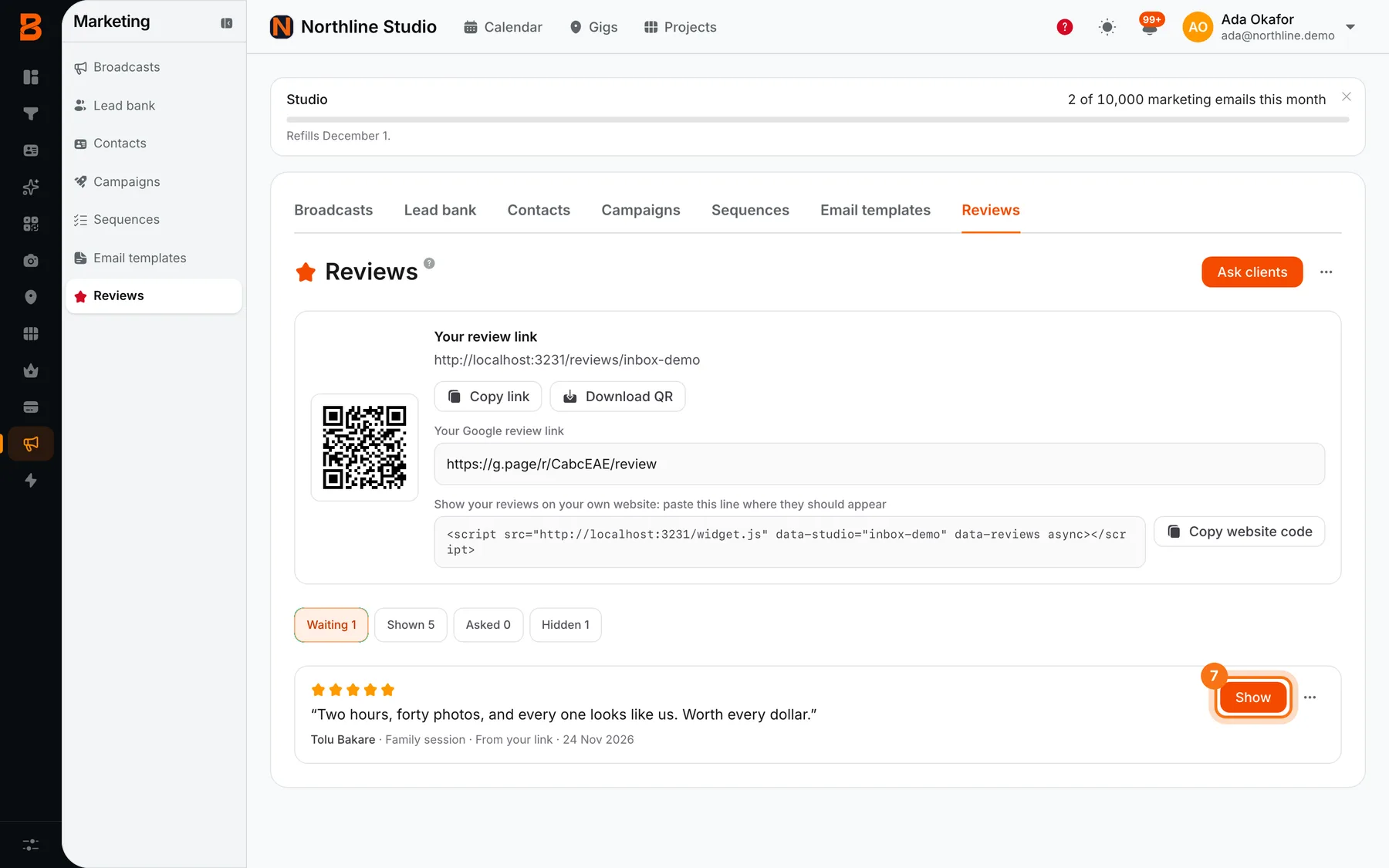
How bckendIQ solves it. Reviews is a new page in Marketing. Clients leave a review from a link or a QR code, and can add a photo, a selfie or a selfie video. Each one waits for you, and only a review you press Show on is public. Tick one box and each client is asked 2 days after their work is delivered, with one reminder 6 days later. The email is yours to reword. Everyone who leaves a review is offered your Google review link. One line of code puts the reviews you show on your own website, and you can pick them on a pop-up page.
Problem 2
A client left a note on photo 214, and you answered somewhere else
The bride pins a note to a photo: can you soften this one. You answer in WhatsApp. A week later your editor opens the photo and sees her note. He has no idea what you told her.
How bckendIQ solves it. Every client note in a gallery now has Reply. Your answer sits under her note, on that photo or that moment of the film, and she can answer back. Type it, dictate it, record a voice note or attach a file. The client gets an email that says you replied, and her link opens on the replies waiting for her. The whole conversation shows in the task chat’s Client tab, where your team can reply too.
Problem 3
One evening shoot closed your whole day to calls
You have a one hour shoot at six. A couple opens your call link, wanting to talk that morning. The page shows no times at all. They book a call with a studio that had one.
How bckendIQ solves it. A shoot now closes its own hours on your call calendar, plus an hour either side. Work with no hours on it still takes the day. The date on an enquiry that has not booked closes nothing.
Every change this week (15)
Reviews is a new page in Marketing
A client leaves a review from your link or QR code. It waits for you, and only one you show is public. Every reviewer is offered your Google review link.
Open it in bckendIQ →A client can add a photo, a selfie or a selfie video to a review
The video is recorded on the front camera, straight from the review page.
Open it in bckendIQ →Reviews can be asked for 2 days after a delivery
Tick the box and each client is asked for you. Anyone who has not answered gets one reminder 6 days later, never a second. The email’s subject and message are yours to reword.
Open it in bckendIQ →Ask clients has Everyone not asked yet
One tick asks your whole list. A client is asked once.
Open it in bckendIQ →Show your reviews on your own website
Copy website code and paste one line into your site. The reviews you show appear there.
Open it in bckendIQ →Reply to a client’s note on a photo or film
Reply sits under any note in the viewer. The client can answer back from their gallery link, their portal or the watch page.
Open it in bckendIQ →A reply is written in the full comment box
Dictate, record a voice note, attach a file or draw. An @ button tags a teammate, and clients never see it.
Open it in bckendIQ →The client is emailed when you reply to their note
One letter covers a run of replies. Their link opens on the replies waiting for them.
Open it in bckendIQ →The task chat’s Client tab shows each conversation whole
It takes a reply too, posted on the same photo.
Open it in bckendIQ →A shoot closes its own hours to calls, not the whole day
Its real start and end, with an hour kept free each side. Work with no hours on it still takes the day. An unbooked enquiry date closes nothing.
Open it in bckendIQ →Photos picked in the viewer can be downloaded
Download sits beside Delete, and the picked frames come down as one ZIP.
Open it in bckendIQ →A call still booked after its time asks for an outcome
Even when the lead is already Won. A call still ahead stays in Coming up.
Open it in bckendIQ →Each pop-up testimonial takes a photo, what they do and a video link
Edited on its own card. YouTube and Vimeo play inside the card. A testimonial can be a video alone.
Open it in bckendIQ →Next on a pop-up’s Free consultation opens the calendar on the page
The visitor’s details are already filled in, and Back returns to them.
Open it in bckendIQ →On a phone, the Timeline stays where you left it
Resting a thumb in the middle of a swipe used to throw it six months away.
Open it in bckendIQ →
Questions about this week
- How do I collect reviews from my photography clients?
- Open Marketing, then Reviews. Share your review link or QR code, or press Ask clients. Tick Ask each client 2 days after their work is delivered and it asks for you.
- Does every review show in public?
- No. A new review waits for you. Only a review you press Show on reaches your public page, your website or a pop-up page. Hide makes it private again.
- How do I answer a client’s note on a photo?
- Open the photo and press Reply under the note. The client is emailed, and their link lists the replies waiting for them. They can answer back on the same photo.
bckendIQ runs enquiries, contracts, payments, galleries and crew for photo and video studios, in one place. Start free, no card needed →