

The studio issue · No. 47
The couple loved the call. Then nobody followed up
By Jide Odukoya, Founder7 min read4 problems
The call went well. The couple said they would talk it over. Two weeks later you remember them, in the car, on the way to another wedding.
Four problems most studios know. Each is below, with what bckendIQ did about it this week. Every other change sits at the bottom, closed.
Problem 1
The call went well, and then nobody followed up
You take four calls in a week. One couple wants to think. One never shows. A fortnight on, you cannot say which was which. The couple who wanted to think has booked someone else.
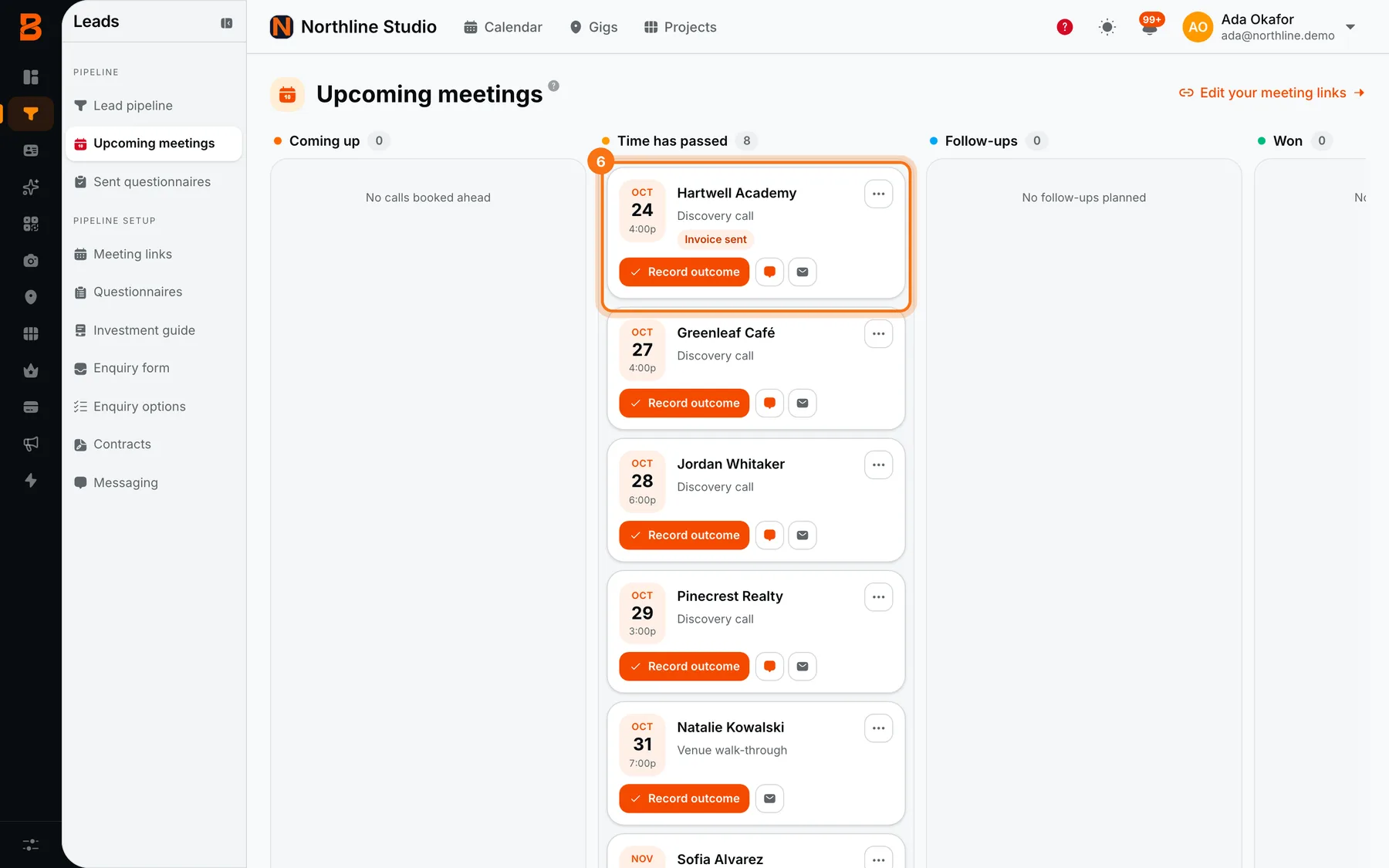
How bckendIQ solves it. Upcoming meetings is now a board of five columns: Coming up, Time has passed, Follow-ups, Won and Lost. After a call, press Record outcome and pick Won, Follow up, Lost or No-show. Follow up asks for a day, and on that day the lead’s owner gets a reminder. Drag a card onto a column and it records the same thing. The message button on each card writes to them without leaving the page. A call whose time has passed can still be moved to a new time, by you or by the client.
Problem 2
You marked the lead Lost, and their call is still on your calendar
A couple goes with another studio. You mark them Lost and move on. Their consultation next Tuesday stays on your calendar. It holds the slot on your booking page, and it keeps sending them reminders.
How bckendIQ solves it. A lead you mark Lost or move to the bin now gives its dates back. A consultation still ahead is cancelled, its slot is free again, and both of you get the cancellation email. A free pop-up session is cancelled too, and its seat is free for someone else. Anything a client paid for is left alone. Restoring the lead does not bring the dates back, so you rebook.
Problem 3
A couple wants a call, and your website sends them somewhere else
A bride is on your website at midnight, ready to talk. Your call link opens another site. Some couples follow it. Some close the tab.
How bckendIQ solves it. Each meeting type now has Put it on your website in its three dots. Paste one line of code into your site. Pick a Book a call button in your colour, or the calendar inside your page. Pick a Light or Dark panel to match. The couple books without leaving your site. The meeting type editor now saves as you work.
Problem 4
A guest wants the photo emails to stop, and the only button is Report spam
A guest has her photos and wants no more letters. Her mail app offers one button, Report spam. She presses it. Every report makes it harder for your next letter to reach an inbox.
How bckendIQ solves it. Every guest letter now carries the mail app’s own Unsubscribe button. One press and the photo letters stop. A link in every letter stops them too, or turns them back on. Her gallery page stays open. On your guest list, that guest reads Emails off.
Every change this week (24)
Record what came of each call
Record outcome offers Won, Follow up, Lost or No-show. Paid shows by itself, read from the lead’s real invoices.
Open it in bckendIQ →Upcoming meetings is a board of columns
Coming up, Time has passed, Follow-ups, Won and Lost. Drag a card onto a column to record that outcome. A phone shows one column at a time.
Open it in bckendIQ →A follow up day sends a reminder
On the day you planned, the lead’s owner gets a bell and a push. It is skipped when a call is already booked ahead.
Open it in bckendIQ →Message a caller from their card
Email and text send from bckendIQ. WhatsApp opens on your phone with your words already typed.
Open it in bckendIQ →A meeting whose time has passed can be moved
By the client and by you. The new time must be an open slot. A meeting that already happened cannot be cancelled.
Open it in bckendIQ →A lead marked Lost or binned gives its dates back
A consultation still ahead is cancelled and both sides are emailed. A free pop-up session is cancelled and its seat freed. Anything paid for is left alone.
Open it in bckendIQ →Put a consultation call on your own website
Each meeting type has Put it on your website. One line of code gives a Book a call button in your colour, or the calendar inside your page.
Open it in bckendIQ →Every website button comes in Light or Dark
The enquiry form, the pop-up booking and the consultation call. Code you pasted before looks as it did.
Open it in bckendIQ →The meeting type editor saves as you work
A pause in typing saves. So does closing the form, leaving the page or closing the tab.
Open it in bckendIQ →Every guest letter carries the mail app’s own Unsubscribe button
A guest who presses it gets no more photo letters. Their gallery page is untouched.
Open it in bckendIQ →A guest stops or restarts photo emails from a link in every letter
Your guest list marks that guest Emails off.
Open it in bckendIQ →A film goes up in parts
A dropped connection now costs one part, which retries on its own, not the whole film. A retry goes into the empty job the last try left.
Open it in bckendIQ →Pick part of a gallery off the filmstrip and delete it
In the viewer, every frame on the filmstrip has a tick box. Shift click picks a run. A bar counts what is picked and asks before it deletes.
Open it in bckendIQ →A client’s Wait ’n’ Get and hand made galleries show on their page
The Gallery tab lists every gallery no job made. Add gallery makes one for this client, or attaches one already made.
Open it in bckendIQ →A Wait ’n’ Get gallery on a client’s link has Download all
It used to be one tap per photo. The gallery’s own download switch and PIN still apply.
Open it in bckendIQ →SVG files go into a gallery as design files
A folder of logo SVGs used to upload nothing. Each one now goes in with a Design file badge and saves as a download.
Open it in bckendIQ →An enquiry form step with nothing to ask drops out
The client’s page walks only the steps that have a question. The send button’s words are yours to type.
Open it in bckendIQ →A day event on a pop-up holds up to 50,000 guests
A 300 guest open day used to sell one seat. The box on a day ticket now reads Guests per day.
Open it in bckendIQ →A sequence can be up to 16 emails
The picker and the AI writer both go to 16, and the number you pick wins over the brief. A sequence AI drafted for you is kept as drafted.
Open it in bckendIQ →Throwaway inboxes never enter your lead bank
An address made to be thrown away, or one nobody reads, is left out at import, and the preview says why. A sequence stops writing to someone who never opens.
Open it in bckendIQ →The client timeline uses plain stage names
Booked, Started, In Progress, Review and Completed. They fit any kind of job, not only a shoot.
Open it in bckendIQ →A job handed to someone else leaves the old lane at once
The Timeline used to draw it on both lanes until you reloaded the page.
Open it in bckendIQ →A sign in that fails says what happened
A cancelled Google sign in used to say your account was removed. It now says the sign in did not finish and nothing changed.
Smaller fixes across the app
Buttons on cards you can drag now answer a tap on a phone. The event name on a guest QR table card can be typed over. Project checkboxes are outlines again, and a card’s shoot type shows your own name for it.
Open it in bckendIQ →
Questions about this week
- How do I record what happened on a consultation call?
- Open Leads, then Upcoming meetings. Press Record outcome on the call and pick Won, Follow up, Lost or No-show. Or drag the card onto a column.
- What happens to a lost lead’s booked call?
- It is cancelled when you mark the lead Lost or bin it. The slot is free again and both of you get the cancellation email. Anything the client paid for is left alone.
- Can clients book a call on my own website?
- Yes. Open Meeting links, press the three dots on a meeting type, then Put it on your website. Paste the line of code into your site as a button or inside the page.
- Can a wedding guest stop the photo emails?
- Yes. Every guest letter has the mail app’s Unsubscribe button and a link that stops the emails or turns them back on. Your guest list marks that guest Emails off.
bckendIQ runs enquiries, contracts, payments, galleries and crew for photo and video studios, in one place. Start free, no card needed →